
TryHackme: Further Nmap Walkthrough
An in depth look at scanning with Nmap, a powerful network scanning tool. You can access the room from https://tryhackme.com/room/furthernmap

Hi everyone, I am Mrinal Prakash aka EMPHAY and today I would take you to the walkthrough of the Further Nmap room on TryHackme. Lets go ahead and deploy the machine.

Alright we have deployed the machine and now lets go through what lies in there.
TASK 1- Deploy
Deploy the attached VM
No Answers needed
TASK 2- Introduction
What networking constructs are used to direct traffic to the right application on a server?
PortsHow many of these are available on any network-enabled computer?
65535[Research] How many of these are considered “well-known”? (These are the “standard” numbers mentioned in the task)
1024
TASK 3- Nmap Switches
What is the first switch listed in the help menu for a ‘Syn Scan’ (more on this later!)?
-sSWhich switch would you use for a “UDP scan”?
-sUIf you wanted to detect which operating system the target is running on, which switch would you use?
-ONmap provides a switch to detect the version of the services running on the target. What is this switch?
-sVThe default output provided by nmap often does not provide enough information for a pentester. How would you increase the verbosity?
-vVerbosity level one is good, but verbosity level two is better! How would you set the verbosity level to two?
(Note: it’s highly advisable to always use at least this option)
-vv
We should always save the output of our scans — this means that we only need to run the scan once (reducing network traffic and thus chance of detection), and gives us a reference to use when writing reports for clients.
7. What switch would you use to save the nmap results in three major formats?
-oA
8. What switch would you use to save the nmap results in a “normal” format?
-oN
9. A very useful output format: how would you save results in a “grepable” format?
-oG
Sometimes the results we’re getting just aren’t enough. If we don’t care about how loud we are, we can enable “aggressive” mode. This is a shorthand switch that activates service detection, operating system detection, a traceroute and common script scanning.
10. How would you activate this setting?
-A
Nmap offers five levels of “timing” template. These are essentially used to increase the speed your scan runs at. Be careful though: higher speeds are noisier, and can incur errors!
11. How would you set the timing template to level 5?
-T5
We can also choose which port(s) to scan.
12. How would you tell nmap to only scan port 80?
-p 80
13. How would you tell nmap to scan ports 1000–1500?
-p 1000–1500
A very useful option that should not be ignored:
14. How would you tell nmap to scan all ports?
-p-
15. How would you activate a script from the nmap scripting library (lots more on this later!)?
— script
16. How would you activate all of the scripts in the “vuln” category?
— script=vuln
TASK 4: [Scan Types] Overview
Read the Scan Types Introduction.
No Answers needed
TASK 5: [Scan Types] TCP Connect Scans
Which RFC defines the appropriate behaviour for the TCP protocol?
RFC 793If a port is closed, which flag should the server send back to indicate this?
RST
TASK 6: [Scan Types] SYN Scans
There are two other names for a SYN scan, what are they?
Half-Open, StealthCan Nmap use a SYN scan without Sudo permissions (Y/N)?
N
TASK 7: [Scan Types] UDP Scans
If a UDP port doesn’t respond to an Nmap scan, what will it be marked as?
open|filteredWhen a UDP port is closed, by convention the target should send back a “port unreachable” message. Which protocol would it use to do so?
ICMP
TASK 8: [Scan Types] NULL, FIN and Xmas
Which of the three shown scan types uses the URG flag?
xmasWhy are NULL, FIN and Xmas scans generally used?
Firewall EvasionWhich common OS may respond to a NULL, FIN or Xmas scan with a RST for every port?
Microsoft Windows
TASK 9: [Scan Types] ICMP Network Scanning
How would you perform a ping sweep on the 172.16.x.x network (Netmask: 255.255.0.0) using Nmap? (CIDR notation)
nmap -sn 172.16.0.0/16
TASK 10: [NSE Scripts] Overview
What language are NSE scripts written in?
LuaWhich category of scripts would be a very bad idea to run in a production environment?
intrusive
TASK 11: [NSE Scripts] Working with the NSE
What optional argument can the
ftp-anon.nsescript take?
maxlist
TASK 12: [NSE Scripts] Searching for Scripts
Search for “smb” scripts in the /usr/share/nmap/scripts/ directory using either of the demonstrated methods.
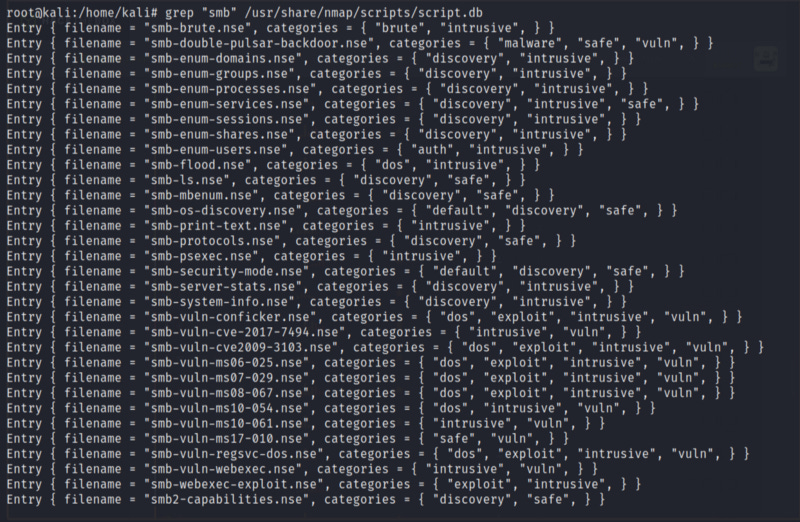
What is the filename of the script which determines the underlying OS of the SMB server?
smb-os-discovery.nseRead through this script. What does it depend on?

smb-brute
TASK 13: Firewall Evasion
Which simple (and frequently relied upon) protocol is often blocked, requiring the use of the
-Pnswitch?
ICMP[Research] Which Nmap switch allows you to append an arbitrary length of random data to the end of packets?
— data-length
TASK 14: Practical
Does the target (
10.10.243.79)respond to ICMP (ping) requests (Y/N)?
NPerform an Xmas scan on the first 999 ports of the target — how many ports are shown to be open or filtered?

999
There is a reason given for this — what is it?
Note: The answer will be in your scan results. Think carefully about which switches to use — and read the hint before asking for help!
No ResponsePerform a TCP SYN scan on the first 10000 ports of the target — how many ports are shown to be open?
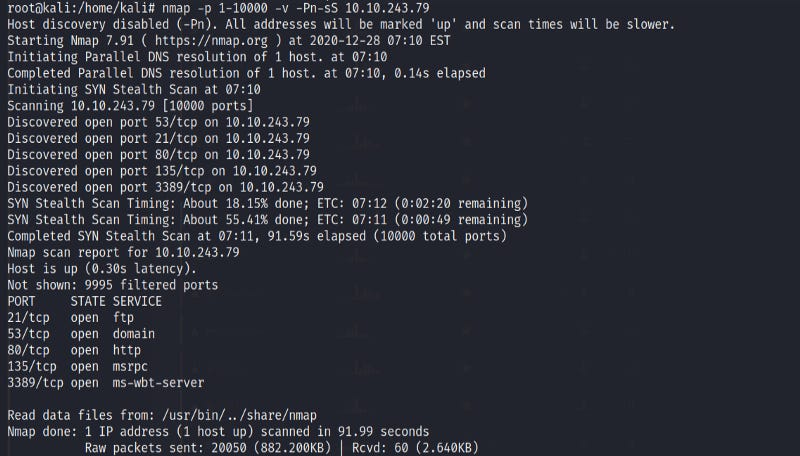
5
Open Wireshark (see Cryillic’s Wireshark Room for instructions) and perform a TCP Connect scan against port 80 on the target, monitoring the results. Make sure you understand what’s going on.
No Answers neededDeploy the
ftp-anonscript against the box. Can Nmap login successfully to the FTP server on port 21? (Y/N)
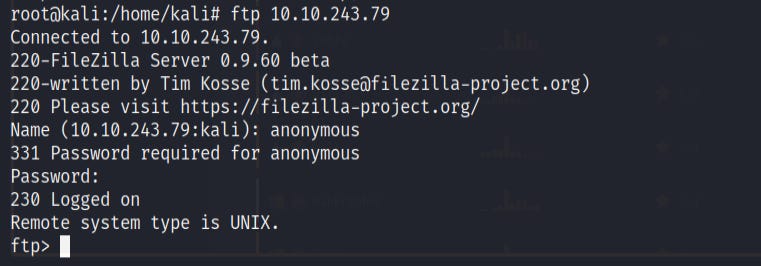
Y
TASK 15: Conclusion
Read the conclusion.
No Answers needed
Hope you all enjoyed going through this walkthrough. If you like my article clap for me and do follow me as well. Till then goodbye and Happy Hacking.